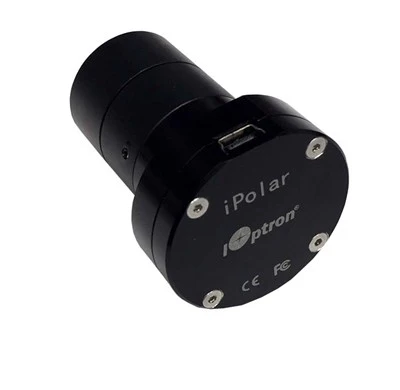
If you bought an iOptron HEM15, HEM27, or HEM44 without iPolar, you still have several ways to polar align it. You can use an imaging-camera routine, iOptron's Polar Iterate Align procedure, or other software. The 3339A-HEM gives you another option: a dedicated polar-alignment camera mounted permanently inside the HEM's right-ascension axis.
That dedicated location is the appeal. The iPolar looks directly along the mount's polar axis rather than through your imaging telescope. Connect it to a Windows computer, let iOptron's software plate-solve the stars around the celestial pole, and the program shows you how to move the mount's altitude and azimuth controls until the RA axis is aligned.
You do not have to identify Polaris or Sigma Octantis, and the pole star itself does not need to be visible. The iPolar works from the surrounding star field across an approximately 13° field of view and operates in either hemisphere without changing hardware. iOptron specifies a maximum polar-alignment precision of about 30 arcseconds.
The 3339A-HEM is made specifically for the HEM15, HEM27, and HEM44 families. It installs internally in the polar-axis opening and connects to the mount's electronics, leaving the camera protected inside the mount and giving you an iPolar connection at the control panel rather than another camera and cable hanging from the telescope.
Key Features
-
Made for the HEM15, HEM27, and HEM44. The 3339A-HEM is iOptron's internal iPolar configuration for these hybrid strain-wave mount families.
-
Dedicated polar-alignment camera. Because iPolar looks along the RA axis, polar alignment does not depend on the focal length, field of view, or orientation of your imaging telescope.
-
Approximately 13° field of view. The wide polar-region field gives the software enough sky to identify star patterns and determine the location of the celestial pole.
-
No need to identify the pole star. Polaris or Sigma Octantis itself does not have to be visible. The software plate-solves the surrounding star field instead.
-
Approximately 30-arcsecond maximum alignment precision. iOptron specifies maximum polar-alignment precision of about 30 arcseconds.
-
Works in both hemispheres. The same system works around either celestial pole without selecting a different optical configuration.
-
Smart plate solving. The software identifies the polar-region star field and calculates the relationship between the mount's RA axis and the true celestial pole.
-
On-screen adjustment guidance. Instead of placing Polaris at a clock position on an optical reticle, you move the mount's altitude and azimuth controls while watching the alignment markers converge on screen.
-
Image enhancement for difficult skies. Exposure adjustment and iOptron's image-processing tools help the camera detect usable stars under less-than-ideal sky conditions.
-
Mask obstructions. The iPolar software includes a Draw Mask function that lets you exclude parts of the image blocked by tree branches, buildings, or other fixed obstructions from the plate solve.
-
Internal installation. The iPolar camera fits inside the HEM's polar-axis assembly rather than mounting externally on the telescope or mount body.
-
USB 2.0 connection. Once installed, connect a computer to the mount's iPolar port and run the iPolar software.
Why Use a Dedicated Polar Camera?
Many imagers already polar align through their main camera, and if that system works reliably there is nothing wrong with continuing to use it.
iPolar offers a different approach. Its camera is dedicated to one job and permanently oriented with the mount's RA axis. Changing telescopes, cameras, reducers, focus positions, or imaging fields does not change the polar-alignment camera.
That can be useful when you move the same HEM between several telescope setups or regularly travel to different observing sites. You set up the mount, connect the iPolar, perform the alignment, and then move on to the rest of the imaging system.
It also separates polar alignment from the main telescope. A long-focal-length SCT, small imaging sensor, narrowband filter, or unusual camera orientation no longer determines what field the polar-alignment routine has available.
How iPolar Works
The iPolar is a 1.2-megapixel electronic polar camera with an approximately 13° field of view. During setup, the RA axis should first be pointed roughly toward the appropriate celestial pole; iOptron's current manual calls for being within approximately ±6°.
After connecting the camera, the software uses your observing location and a dark frame, then examines the polar-region image and plate-solves the visible stars.
Once it knows the star field, the program determines where the mount's RA axis is pointing in relation to the calculated celestial pole. The screen then displays the camera center and virtual pole.
You adjust the mount's azimuth and altitude controls until those markers overlap. When they coincide within the software's tolerance, polar alignment is complete.
About RA Rotation During Setup
There is one part of the process worth understanding before you use iPolar for the first time.
The software needs to know the exact center of rotation of the RA axis. During the camera-center determination process, it may ask you to confirm one position and then rotate the mount in right ascension so it can establish another position and calculate that center.
Once the system has a valid camera center, that information can be retained, and the software provides a recalibration command if the camera has moved or the alignment results no longer appear accurate.
So iPolar is straightforward to use, but we would not describe it as a system that never requires RA-axis rotation. Follow the current on-screen instructions and let the software determine what it needs for that session.
Polaris Does Not Have to Be Visible
This is one of the biggest differences between iPolar and a conventional optical polar scope.
An optical polar scope normally asks you to identify the pole star and place it at a calculated position on a reticle. iPolar instead identifies a pattern of stars around the celestial pole.
That means Polaris itself can be outside the usable portion of the image and the system can still work, provided enough surrounding sky remains visible for the plate solve.
iOptron also provides a masking tool for fixed obstructions. If a tree branch or part of a building intrudes into the camera's field, that region can be excluded from the plate-solving image rather than forcing the software to work around it.
It is still a camera, however. It needs enough stars in the polar region to obtain a successful solve. “No pole star required” does not mean “no view of the polar sky required.”
Why Polar Alignment Still Matters on an EC Mount
The HEM27EC and HEM44EC use a high-precision encoder on the RA axis to reduce the periodic tracking error produced by the strain-wave drive.
That encoder does not polar align the mount.
If the RA axis is pointed away from the celestial pole, the telescope can still develop declination drift and field rotation even though the encoder is doing its job correctly. Accurate polar alignment therefore remains valuable whether you guide normally, experiment with long-cadence guiding, or try unguided imaging at a suitable image scale.
The iPolar and the RA encoder solve different problems: one establishes where the RA axis points; the other improves how that axis tracks.
Installation in a HEM Mount
The 3339A-HEM is an internal accessory, so installation involves more than plugging an external camera into the mount.
iOptron's installation procedure calls for removing the iPolar adapter from the polar-axis opening, sliding the camera into that adapter, and securing it with the supplied setting screws. The lower cover and control-board cover are then removed so the iPolar cable can be routed internally and connected to the main board.
The camera and adapter are then reinstalled in the RA-axis opening and the covers are replaced.
A set of metric hex keys is required. The procedure is straightforward, but it does involve opening part of the mount, so follow iOptron's illustrated installation sheet rather than treating it as a plug-in external accessory.
Which HEM Mounts Use This Version?
iOptron currently lists the 3339A-HEM for the:
- HEM15 family
- HEM27 family
- HEM44 family
This includes standard and EC configurations that were purchased without an installed iPolar.
If your HEM already came from iOptron with iPolar installed, you do not need to add another one.
What Alignment Looks Like
Start with the mount roughly pointed toward the north celestial pole in the Northern Hemisphere or the south celestial pole in the Southern Hemisphere. The RA axis needs to begin within the iPolar camera's usable field.
Connect the iPolar to a Windows computer, launch the software, and verify your location information. Take the requested dark frame and adjust the exposure if necessary until the software can detect and plate-solve the polar-region stars.
Follow the on-screen instructions for camera-center determination. If the program requests an RA-axis rotation, allow it to establish the additional position before continuing.
Once the virtual pole and camera center are displayed, leave the tripod fixed and use only the mount's altitude and azimuth adjustments to move the two markers together.
When they overlap and turn green, the polar alignment is complete.
What's Included
- iOptron iPolar electronic polar scope for HEM mounts, #3339A-HEM
- Internal iPolar connection cable
iPolar software is available as a free download from iOptron. Installation requires a compatible HEM15, HEM27, or HEM44 mount and metric hex keys.
Frequently Asked Questions
Which iPolar fits the HEM15, HEM27, and HEM44?
iOptron currently lists the 3339A-HEM as the internal iPolar configuration for the HEM15, HEM27, and HEM44 families.
Can I add iPolar to a HEM I already own?
Yes, provided it is a compatible HEM configuration that was supplied without iPolar. The camera installs internally in the polar-axis assembly and connects to the mount's main board.
Does iPolar require Polaris?
No. The software plate-solves stars around the celestial pole, so Polaris itself does not have to be visible. Enough surrounding polar-region sky must still be visible for the camera to detect and solve stars.
Does it work in the Southern Hemisphere?
Yes. iOptron specifies global operation without requiring separate northern- and southern-hemisphere hardware.
How accurate is iPolar?
iOptron specifies maximum polar-alignment precision of approximately 30 arcseconds.
What is the iPolar field of view?
Approximately 13°.
Do I have to rotate the RA axis?
The current iPolar workflow may require RA-axis rotation while establishing or confirming the camera center. Follow the software's on-screen instructions rather than assuming the axis will remain stationary throughout every alignment.
Does it need a Windows computer?
iOptron's official iPolar software supports 64-bit Windows and requires Microsoft .NET Framework 4.8 or later. The current iOptron product page lists Windows 7, 8.1, 10, and 11.
Can I just use NINA, SharpCap, or my imaging camera instead?
Yes. The HEM does not require iPolar. If your existing camera-based polar-alignment routine is reliable and convenient, you may not need this accessory. iPolar's advantage is having a dedicated polar camera permanently installed in the mount and independent of your imaging telescope.
Is iPolar especially useful on the HEM27EC or HEM44EC?
It can be. The RA encoder corrects tracking behavior in right ascension but cannot correct an incorrectly aligned polar axis. Accurate polar alignment remains important for controlling declination drift and field rotation, particularly when trying to minimize guiding corrections or experiment with unguided imaging.
Final Thoughts
The 3339A-HEM is not something every HEM owner needs. If you already polar align quickly and reliably through your imaging camera, there is no reason to add another system simply because the opening exists.
Its value is consistency. The camera stays inside the mount, looks along the polar axis, and performs the same job regardless of which telescope or imaging train is sitting on the saddle that night.
For someone who moves a HEM15, HEM27, or HEM44 between different rigs or observing sites, that can make polar alignment a self-contained part of setting up the mount rather than another function that depends on the rest of the imaging system.
If that is the workflow you want, the 3339A-HEM is the iPolar made to become part of the HEM rather than another accessory hanging from it.