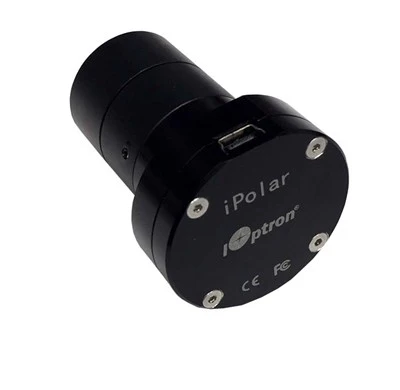
The iOptron iPolar replaces the traditional optical polar scope with a small plate-solving camera mounted directly in the polar axis. Instead of looking through a reticle and trying to place Polaris or Sigma Octantis in the correct position, you connect the iPolar to a computer and let the software determine where the mount's right-ascension axis is pointing relative to the true celestial pole.
This listing covers the internal iPolar versions for the CEM40, CEM60, and CEM120 families. The iPolar itself performs the same job in all three. What changes is the internal mounting hardware and cable needed for that particular mount. Simply select your mount family from the pull-down menu above.
Once installed, the camera lives inside the RA axis and connects through the mount's internal electronics. There is no polar-scope camera hanging from the back of the mount and no extra camera cable moving with the RA axis. For a mount that stays assembled or lives in an observatory, it becomes a dedicated polar-alignment system that is always there regardless of which telescope, camera, reducer, or imaging train happens to be on the saddle.
iOptron specifies an approximately 13° field of view and maximum alignment precision of about 30 arcseconds. The pole star itself does not have to be visible. iPolar plate-solves the surrounding polar star field to determine where the true celestial pole lies, then shows you on screen how to move the mount's altitude and azimuth controls until the RA axis and calculated pole coincide.
Select Your Mount
-
CEM40 Internal — #3339A-040. Select this version for the CEM40, CEM40EC, CEM40G, or CEM40NUC. It includes the mount-specific internal adapter and cable for the CEM40 family.
-
CEM60 Internal — #3339A-060. Select this version for the CEM60 or CEM60EC. Some earlier-production CEM60 mounts use a different RA-axis arrangement and may require different adapter hardware. If you have an early CEM60 and are not sure which version you own, contact us before ordering.
-
CEM120 Internal — #3339A-120. Select this version for the CEM120, CEM120EC, or CEM120EC2. It includes the mount-specific internal adapter and connection cable for the CEM120 family.
These three selections are specifically for the CEM40, CEM60, and CEM120 families. The GEM45 family uses a different iPolar configuration, so do not order the CEM40 version for a GEM45.
Key Features
-
Electronic polar alignment. A camera installed along the mount's polar axis replaces the traditional optical polar scope and reticle.
-
Smart plate solving. iPolar identifies the surrounding polar star field and calculates the relationship between the mount's RA axis and the true celestial pole.
-
Approximately 13° field of view. The wide field allows the software to solve the surrounding sky rather than depending on one specific pole star.
-
Up to 30-arcsecond alignment precision. iOptron publishes a maximum alignment precision of approximately 30 arcseconds.
-
Polaris or Sigma Octantis does not have to be visible. The software determines the pole from the surrounding star field rather than requiring you to identify and place the pole star manually.
-
Works in both hemispheres. There is no separate northern- or southern-hemisphere setting to select.
-
On-screen alignment guidance. The software displays the calculated celestial pole and the mount's polar-axis position while you make the final altitude and azimuth adjustments.
-
Built-in image enhancement. Exposure and image-processing controls help the software identify usable stars under less-than-ideal sky conditions.
-
Internal installation. The camera and connection cable stay inside the mount rather than hanging externally from the RA axis.
-
USB 2.0 connection. The computer communicates with the iPolar through the mount's iPolar/USB connection.
-
Plug-and-play camera support. The iPolar has an embedded driver that installs automatically when first connected, so there is no separate camera-driver download required.
-
Free iOptron software. iOptron's current iPolar application is available as a free download for supported 64-bit Windows systems.
- One-year limited warranty.
How iPolar Works
A traditional polar scope asks you to identify a star and position it correctly on a reticle according to the date, time, and your location. iPolar approaches the same problem with a camera and plate solving.
The camera looks through the RA axis at a relatively wide region of sky surrounding the celestial pole. The software identifies stars in the image, determines exactly what part of the sky the camera is seeing, and calculates where the true celestial pole lies relative to the mount's polar axis.
You still make the physical adjustment at the mount. Turn the azimuth controls to move the RA axis left or right and the altitude controls to move it up or down. The difference is that you are watching the relationship between the axis and the true pole directly on the computer screen rather than estimating it through a reticle.
When the software's indicators overlap closely enough, the alignment is complete.
You Don't Have to See the Pole Star
One of the useful differences between iPolar and a traditional optical polar scope is that Polaris in the Northern Hemisphere or Sigma Octantis in the Southern Hemisphere does not itself need to be visible.
iPolar is not trying to center either star. It plate-solves the surrounding polar field and calculates where the actual celestial pole is located within that field.
That does not mean the camera can look through a solid wall or a completely blocked tree. Enough surrounding polar sky still has to be visible for the software to identify stars and solve the image. But a missing pole star by itself does not prevent alignment.
The mount also needs to begin reasonably close to the pole. iOptron specifies that the RA axis should initially be pointed within approximately ±6° of true north or true south. Set the mount roughly toward the pole and approximately to your latitude, and iPolar handles the precision work from there.
What Alignment Looks Like
Connect the iPolar to a supported Windows computer and start the iPolar software. Confirm your observing location and, when appropriate, take a dark frame with the camera covered so hot pixels and camera noise are not mistaken for stars.
Remove the cover and allow the software to begin solving the polar field. Exposure can be adjusted if the program is seeing too few or too many stars.
Once the first position is established, follow the instructions shown by the software. Depending on the existing camera-center information and how closely the mount is already pointed toward the pole, the program may ask you to rotate the RA axis so it can establish another position and determine the camera's center of rotation.
Do not change the mount's altitude or azimuth while it is determining those positions. Once the camera center and virtual pole are established, use the mount's altitude and azimuth adjusters to bring the two indicators together.
The important part is to follow the current software prompts rather than assuming that every alignment requires a fixed amount of RA rotation. How much movement is needed can depend on the existing calibration and how close the mount already is to the pole.
Why Use a Dedicated iPolar?
Modern programs such as NINA, SharpCap, and other imaging packages can perform excellent polar alignment through the main imaging camera. If that method already works reliably for your setup, you may not need a separate polar camera.
The advantage of iPolar is that it belongs to the mount rather than the telescope.
Change from a refractor to an SCT, swap cameras, remove the reducer, install a different filter wheel, or rebuild the imaging train and the iPolar does not care. It remains in the RA axis with the same wide view of the polar region.
That can be particularly convenient in a permanent or semi-permanent installation. You have one dedicated system for checking the mount's polar alignment without having to configure the night's imaging telescope first.
Installation
These are internal iPolar kits, so installation requires opening the appropriate part of the mount and installing the camera in the RA axis. Each of the three selections includes the mount-specific adapter and internal cable required for that family.
The exact installation is different for the CEM40, CEM60, and CEM120. Follow iOptron's installation instructions for the version you select rather than treating them as interchangeable.
Some earlier CEM60 mounts deserve particular attention. iOptron notes that older examples can use a different internal arrangement and may require different adapter hardware. If you have an early CEM60 and are not certain which version you have, contact us before ordering.
If your mount originally came with a factory-installed iPolar, you already have this system. These internal kits are primarily for compatible mounts that were purchased without iPolar or for replacing an existing unit.
What's Included
- 1x iOptron iPolar electronic polar-scope camera
- 1x Internal mounting adapter for the selected CEM40, CEM60, or CEM120 family
- 1x Internal connection cable for the selected mount
Software: iOptron iPolar software is available as a free download.
Not included: mount or computer.
Frequently Asked Questions
Which version should I select?
Choose CEM40 Internal (#3339A-040) for the CEM40 family, CEM60 Internal (#3339A-060) for the CEM60 family, or CEM120 Internal (#3339A-120) for the CEM120 family. The iPolar performs the same basic function in all three; the internal mounting hardware and cable are what change.
Does the CEM40 version fit a GEM45?
No. Although the GEM45 family can use iPolar, it uses a different iPolar configuration. Do not order #3339A-040 for a GEM45.
Can I add iPolar to a mount I already own?
Yes, provided the mount is compatible with the version you select. These kits are intended for compatible CEM40, CEM60, and CEM120 mounts that were purchased without an internal iPolar or need a replacement unit.
Do I have to see Polaris?
No. Polaris itself does not need to be visible. iPolar plate-solves the surrounding polar star field to calculate the location of the true celestial pole. Enough surrounding sky and stars still need to be visible for the plate solve to succeed.
Does it work in the Southern Hemisphere?
Yes. The software works in both hemispheres and does not require Sigma Octantis itself to be visible.
How accurate is iPolar?
iOptron specifies maximum alignment precision of approximately 30 arcseconds. Actual results depend on installation, sky conditions, plate solving, and how carefully the mount's final altitude and azimuth adjustments are made.
How close to the pole do I need to be before starting?
iOptron recommends beginning with the RA axis pointed within approximately ±6° of true north or true south so the polar region falls within the camera's approximately 13° field.
Do I need to rotate the RA axis?
Possibly. The software may ask you to rotate the RA axis while it establishes the camera center and a second reference position. Follow the current on-screen instructions rather than using a predetermined amount of rotation.
Do I have to recalibrate the camera every night?
No. Camera-center information can be retained. The software can determine or recalibrate the center again when necessary, such as after the iPolar has been moved or if alignment results no longer appear consistent.
Does iPolar replace NINA, SharpCap, or another imaging-camera polar-alignment routine?
Not necessarily. If polar alignment through your main imaging camera already works well for you, you may not need a dedicated iPolar. The advantage of iPolar is that it stays with the mount and does not depend on the telescope or imaging train currently installed.
Does iOptron's software work on a Mac?
iOptron's official current iPolar software is for 64-bit Windows. Third-party macOS software may be available separately, but it is not part of iOptron's official software package.
What if I have an older CEM60?
Some earlier CEM60 mounts may require different adapter hardware for an internal iPolar installation. If you are unsure which CEM60 you have, contact us before ordering and we'll help identify the correct setup.
Final Thoughts
There are several good ways to polar align a modern equatorial mount, and iPolar does not make those other methods obsolete. Its advantage is that the polar-alignment camera belongs to the mount.
It stays inside the RA axis, works independently of the telescope and imaging camera, does not require you to identify the pole star through a reticle, and is ready whenever you want to check or refine the mount's alignment.
If your CEM40, CEM60, or CEM120 was purchased without iPolar, choose the matching internal version from the pull-down menu above. You get the same iPolar system with the mounting hardware and internal cable appropriate for your particular mount family.